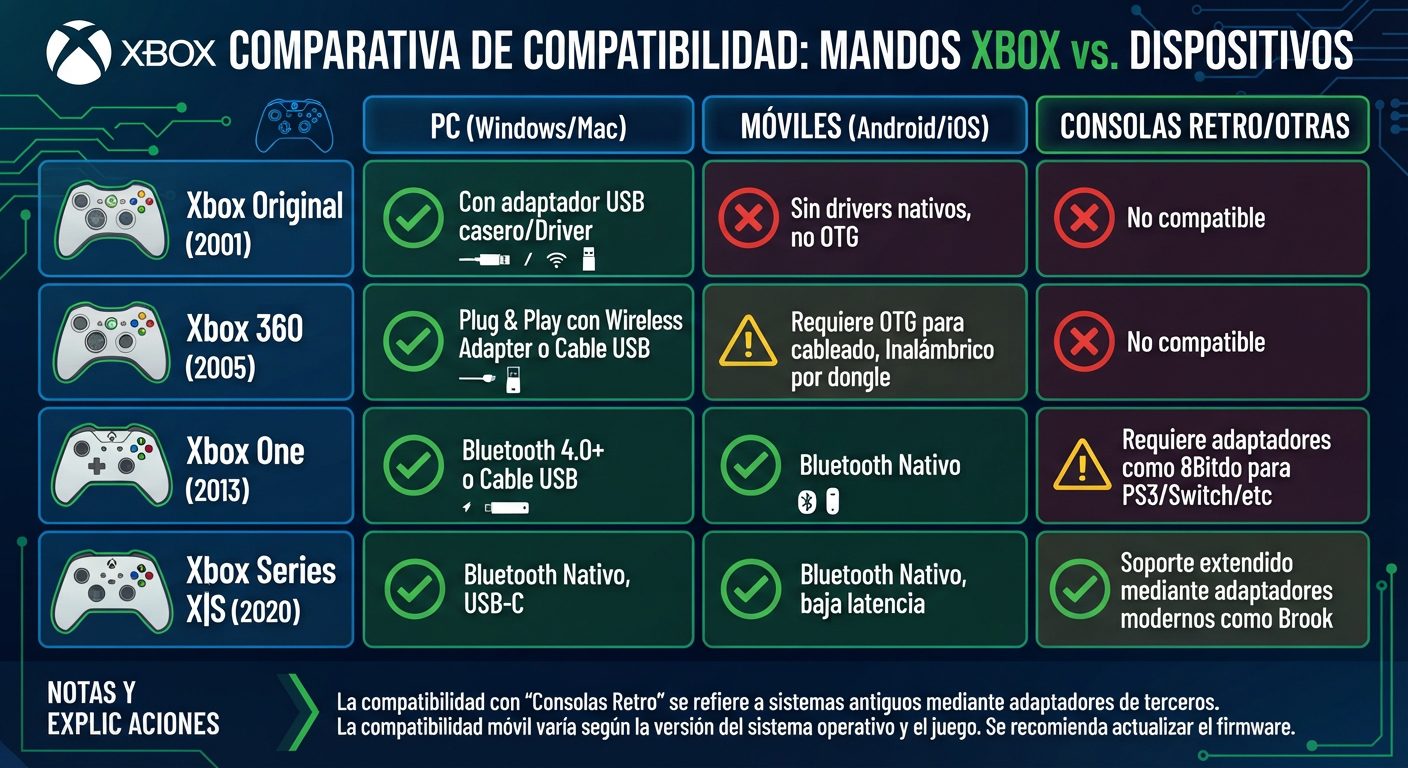
The evolution of Xbox controllers hasn't just changed the design, sticks, or connectivity: it has also significantly transformed the possibilities of using them outside their original console.An
Xbox Original controller, an
Xbox 360 controller, an
Xbox One controller, and the current
Xbox Series X|S controller may look similar at first glance, but they use different connection technologies. That's why compatibility with
PC, Android, iPhone/iPad, and retro consoles depends on both the generation and the specific model and adapter used.The following comparison uses the provided infographic as a reference and adds some important clarifications to avoid confusion, especially regarding the Xbox One and Xbox 360 controllers.

Quick compatibility comparison
| Xbox controller | Windows PC | Mac | Android | iPhone/iPad | Retro consoles |
|---|
| Xbox Original (2001) | 🟡 Specific adapter/solution | 🟡 Adapter/driver | 🔴 No native Bluetooth | 🔴 No native Bluetooth | 🟡 Adapters |
| Xbox 360 (2005) | 🟢 USB / wireless receiver | 🟡 Depends on connection and software | 🟡 OTG + adapter/receiver depending on model | 🔴 No native Bluetooth support | 🟡 Specific adapters |
| Xbox One (2013) | 🟢 USB or wireless | 🟢/🟡 Depending on model and connection | 🟢 On Bluetooth models | 🟢 On compatible Bluetooth models | 🟡 Adapters |
| Xbox Series X|S (2020) | 🟢 Bluetooth / USB | 🟢 Bluetooth/USB depending on system | 🟢 Bluetooth | 🟢 Bluetooth | 🟢/🟡 With compatible adapter |
Key: 🟢 compatible · 🟡 compatible with conditions/adapter · 🔴 not natively compatible.
Important: "Xbox One" does not refer to a single controller revision. The first Xbox One controllers did not include Bluetooth, while later revisions did. This difference is essential when trying to connect the controller to a phone or tablet.
Which Xbox controller is most compatible with PC, mobile devices, and retro consoles?
If we're looking for a single winner in terms of versatility, the
Xbox Series X|S controller is currently the easiest to use.Microsoft specifies that the Xbox Wireless Controller is compatible with
Xbox Series X|S, Xbox One, Windows 10/11, Android, and iOS, using Xbox Wireless on consoles and Bluetooth on compatible PCs and mobile devices. (
xbox.com)The
Xbox One with Bluetooth also offers excellent compatibility, but you need to check which revision of the controller you have.The
Xbox 360 and Xbox Original controllers are much more interesting for collectors and users of classic hardware, although they require more adapters or specific solutions to be used outside their original ecosystem.
Xbox Original: the classic 2001 controller
The first Xbox controller belongs to an era before Bluetooth became a standard method for connecting controllers.That's why it doesn't work with an Android phone or an iPhone simply by turning on Bluetooth.
PC compatibility
The original controller can be used on certain computers via
adapters and third-party solutions, especially when its connection is converted to USB.This situation shouldn't be confused with that of a modern controller: physically connecting an old controller via USB doesn't necessarily mean Windows or macOS have the appropriate drivers.In this case, compatibility depends especially on the
adapter, driver, and operating system.
Does the Xbox Original controller work on Android?
Not natively via Bluetooth.The original controller wasn't designed around the Bluetooth connectivity used by modern smartphones. To try to use it with Android, you would need a hardware solution that converts its connection into a format the phone can recognize.
Does it work on iPhone or iPad?
There's no native Bluetooth connection here either.Apple lists among the Xbox controllers compatible with its devices the Bluetooth-enabled Xbox Wireless models, including model 1708 and the Xbox Series X and Series S controllers. (
Official Apple Support)The Xbox Original is not part of that scheme.
Can it be used on retro consoles?
Yes, but here the key word is
adapter.There are converters capable of allowing modern controllers or certain older controllers to communicate with different platforms. In the retro market, compatibility depends on the adapter and the specific console.Therefore:
Xbox Original → retro console = possible in certain cases, but not universal.
Xbox 360: excellent for PC, more complicated on mobile
The Xbox 360 controller is probably one of the most well-known controllers in Xbox history and can still be very useful on PC.However, its wireless system shouldn't be confused with Bluetooth.
Wired Xbox 360 on PC
The USB version is the simplest alternative.On Windows, the controller can be recognized as an input device compatible with the Xbox/XInput ecosystem, although on modern systems issues related to drivers, USB ports, or software may arise.
Wireless Xbox 360 on PC
The wireless model needs its
specific Xbox 360 wireless receiver.Microsoft documented the use of the Xbox 360 Wireless Gaming Receiver to connect the wireless controller to a computer. (
Microsoft Learn)A common mistake is thinking that the
modern Xbox Wireless Adapter for Windows also works with Xbox 360 controllers. It doesn't: Xbox 360's wireless system is different.That's why, if you have a wireless Xbox 360 controller and want to use it on PC, you need to look for a
receiver compatible with Xbox 360, not just any Xbox wireless adapter.
Does the Xbox 360 work on Android?
Here the situation is less straightforward.An Xbox 360 controller doesn't have Bluetooth to pair it directly with a phone. Depending on the controller version and the available hardware, it may be possible to use USB connections via
OTG or receiver/adapter-based solutions.Final compatibility will depend on the phone, the operating system, the receiver, and the game.
Does the Xbox 360 work on iPhone?
Not via Bluetooth.Apple focuses its Xbox controller compatibility on models with Bluetooth connectivity, including the Xbox Wireless Controller model 1708 and the Xbox Series X/S controllers. (
Official Apple Support)Therefore, the Xbox 360 is not a recommended option if you're looking for an older controller to use directly with an iPhone or iPad.
Xbox One: the big leap toward Bluetooth
The Xbox One generation is particularly interesting because there are
different revisions of the controller.This detail is essential.
Not all Xbox One controllers have Bluetooth
The first Xbox One controllers use Xbox's own wireless connection rather than Bluetooth.Later revisions incorporated Bluetooth, which opened the door to using them with:
- PC.
- Android.
- iPhone.
- iPad.
- Other Bluetooth-compatible devices.
That's why, if someone asks "does the Xbox One controller work on Android?", the correct answer is:
Yes, if it's a version of the controller with Bluetooth and the device/game is compatible.Xbox One on PC
On PC there are several possibilities:
- USB.
- Xbox Wireless via a compatible adapter.
- Bluetooth on models that include it.
The USB connection is usually the simplest option if you want to avoid pairing issues.
Xbox One on Android
Bluetooth-enabled Xbox One controllers can connect wirelessly to compatible Android devices.This makes them a much more versatile alternative than the Xbox 360.
Xbox One on iPhone and iPad
Compatible Bluetooth models can also be used with Apple devices.Apple explicitly includes the
Xbox Wireless Controller with Bluetooth (model 1708) among the compatible Xbox controllers. (
Official Apple Support)
Xbox Series X|S: the most versatile controller of the four generations
The Xbox Wireless Controller for Xbox Series X|S represents the most complete evolution in this comparison.Microsoft states it can be used with:
- Xbox Series X.
- Xbox Series S.
- Xbox One.
- Windows 10/11.
- Android.
- iOS.
It also includes Bluetooth for wireless connection with compatible PCs, tablets, Android, and iOS devices. (
xbox.com)
Xbox Series X|S on PC
This is one of its best combinations.It can connect via:
Bluetooth → convenient for playing without cables.
USB → direct and stable connection.
Xbox Wireless → using the corresponding system/adapter.For Windows, it's one of the simplest options if you're looking for compatibility with modern games.
Xbox Series X|S on Android
Bluetooth allows it to be paired with compatible Android devices.This is especially useful for:
- Xbox Cloud Gaming.
- Android games that support controllers.
- Emulation.
- Steam Link.
- Remote Play.
- Other remote gaming services.
Microsoft officially confirms the controller's compatibility with Android. (
xbox.com)
Xbox Series X|S on iPhone and iPad
This is also a very solid option.Apple specifically includes the Xbox Series X and Series S controllers among the controllers compatible with iPhone, iPad, Apple TV, Mac, and Apple Vision Pro. (
Official Apple Support)The general procedure consists of putting the controller into pairing mode and selecting it from Bluetooth settings.
Compatibility with retro consoles: can a modern Xbox controller be used?
Here the answer changes completely.A retro console normally
doesn't know directly what to do with a modern Xbox controller, even if both use USB or Bluetooth.The solution is
specific receivers and converters.For example, 8BitDo offers retro receivers that allow certain Xbox One and Xbox Series X|S controllers to be used on classic consoles. Its Retro Receiver for Nintendo 64, for instance, supports Xbox One and Xbox Series X|S among the compatible controllers. (
8BitDo Support)There are also solutions from Brook to convert compatibility between generations and platforms. The company itself differentiates, for example, its Wingman XB 2 and XB 3 converters according to the Xbox console generations they support. (
Brook Accessory)
What does this mean in practice?
There is no universal rule such as:
"Any Xbox controller works on any retro console."
The reality is:
Controller → adapter/receiver → retro consoleand you need to check the compatibility of all three pieces.
Xbox Original vs Xbox 360 vs Xbox One vs Series X|S
Xbox Original
Advantages- Great appeal for collectors.
- Iconic design.
- Can be leveraged with certain adaptation solutions.
Disadvantages- No Bluetooth.
- Greater dependence on adapters.
- Limited mobile compatibility.
Best use: original hardware and retro projects.
Xbox 360
Advantages- Excellent ergonomics.
- Very good PC compatibility via USB or a specific receiver.
- Wide availability of accessories and adapters.
Disadvantages- No Bluetooth.
- The wireless model requires a specific receiver.
- Less practical for smartphones.
Best use: PC, especially with a USB connection or Xbox 360 receiver.
Xbox One
Advantages- Excellent PC compatibility.
- Bluetooth revisions work with Android and iOS.
- Wide availability of adapters.
Disadvantages- Not all revisions have Bluetooth.
- You need to correctly identify the model.
Best use: PC and mobile devices if you have the Bluetooth version.
Xbox Series X|S
Advantages- Bluetooth.
- USB.
- Official compatibility with Windows, Android, and iOS.
- Compatible with Xbox One and Series X|S.
- Broad compatibility via third-party adapters.
Disadvantages- Features may vary depending on the device and game.
- Retro consoles usually require a specific receiver.
Best use: PC + Android + iPhone/iPad + modern Xbox + certain retro systems via adapter.
Which one to choose depending on the device?
| If you want to use the controller on... | Best option |
|---|
| Windows PC | Xbox Series X|S |
| PC with many older games | Xbox 360 / Series X|S |
| Mac | Xbox Series X|S or Bluetooth Xbox One |
| Android | Xbox Series X|S / Bluetooth Xbox One |
| iPhone/iPad | Xbox Series X|S / Bluetooth Xbox One |
| Xbox Original | Original controller |
| Xbox 360 | Xbox 360 |
| Xbox One | Xbox One / Series X|S |
| Xbox Series X|S | Xbox Series X|S |
| Retro consoles | Series X|S or Xbox One + compatible receiver |
What’s the difference between Bluetooth and Xbox Wireless?
This is one of the keys to understanding the whole comparison.
Bluetooth is a standard widely used by phones, tablets, and computers.
Xbox Wireless, on the other hand, is the wireless technology used by Xbox for its consoles and certain accessories.That's why a controller being labeled
"wireless" doesn't automatically mean it has Bluetooth.The Xbox 360 is the best example: it's wireless, but it can't be treated as a conventional Bluetooth controller.The Xbox Series X|S, on the other hand, combines Xbox Wireless with Bluetooth, allowing it to be used on a much wider range of devices. Microsoft explicitly confirms this combination in its specifications. (
xbox.com)
And what about adapters?
Adapters are the piece that can radically change a controller's compatibility.An adapter can act as a translator between:
Xbox → USBXbox → BluetoothBluetooth → retro consoleXbox One/Series → console of another platformFor example, Brook sells adapters capable of using certain Xbox Series X|S controllers on platforms such as Nintendo Switch, PlayStation 4, PC, iOS, and Android, depending on the adapter model. (
Brook Accessory)That's why, before buying an adapter, you should check:
- Exact model of the controller.
- Target platform.
- Type of connection.
- Adapter firmware.
- Game compatibility.
- Additional features such as vibration, audio, or gyroscope.
Which is the most compatible Xbox controller?
If we set aside the nostalgia factor and look for
versatility, the winner is the
Xbox Series X|S.Its combination of Xbox Wireless, Bluetooth, and USB makes it considerably more flexible than older models.Microsoft officially confirms its compatibility with Xbox Series X|S, Xbox One, Windows 10/11, Android, and iOS. (
xbox.com)Additionally, third-party receivers further expand its possibilities on certain retro consoles. For example, 8BitDo confirms compatibility of its retro receivers with Xbox Series X|S controllers on specific classic platforms. (
8BitDo Support)
FAQs about Xbox controller compatibility
Which Xbox controller is best for PC?
The
Xbox Series X|S is the most complete option for a modern PC. It can be used via USB or Bluetooth and has official compatibility with Windows 10/11. (
xbox.com)
Does the Xbox 360 controller have Bluetooth?
No. The wireless Xbox 360 controller uses its own proprietary wireless technology and needs a specific receiver to be used wirelessly on PC.
Do all Xbox One controllers have Bluetooth?
No. The earliest revisions of the Xbox One controller did not include Bluetooth. Later revisions did.
Which Xbox controller works with iPhone?
Apple recognizes certain Bluetooth-enabled Xbox controllers as compatible, including the
Xbox Wireless Controller model 1708 and the
Xbox Series X and Series S controllers. (
Official Apple Support)
Can I connect an Xbox Series X controller to Android?
Yes. The Xbox Wireless Controller for Series X|S can connect via Bluetooth to compatible Android devices. (
xbox.com)
Can I use an Xbox 360 controller on Android?
It's possible through certain USB/OTG solutions and adapters, but
not via direct Bluetooth, because the Xbox 360 controller doesn't use Bluetooth.
Can I use an Xbox One controller on a retro console?
Yes,
with the right receiver or adapter. There's no universal compatibility: you need to check that the adapter is compatible with both the controller and the console.
Can I use an Xbox Series X|S controller on a retro console?
Yes, on certain systems via specific receivers. For example, 8BitDo documents compatibility of its Retro Receivers with Xbox Series X|S controllers on some classic consoles. (
8BitDo Support)
Does the Xbox Original controller work on PC?
It can work through adapters and specific solutions, but it doesn't offer the direct, universal connection of a modern Xbox controller.
Which is the most versatile Xbox controller?
The Xbox Series X|S. It offers the most complete combination of modern connectivity and official compatibility with Windows, Android, and iOS, plus additional possibilities via third-party receivers. (
xbox.com)
Conclusion
The evolution of Xbox controllers can be summarized in four stages.The
Xbox Original represents the pre-Bluetooth era and depends on adapters to step outside its ecosystem.The
Xbox 360 greatly improved the PC experience, but its wireless connection remains proprietary and requires a specific receiver.The
Xbox One introduced a fundamental difference between revisions: the Bluetooth models became a much more interesting alternative for PC and mobile devices.Finally, the
Xbox Series X|S is currently the most complete alternative for anyone looking for a single controller that can be used on
PC, Android, iPhone/iPad, and Xbox, with additional possibilities on certain retro consoles through adapters.The most important rule is simple:
don't just look at whether a controller is "wireless"; identify which wireless technology it uses and what adapter the target device requires.
Sources and references